


CarMax: Used Cars for Sale
4.68.98K Reviews
App Specs
- Version
- 5.0.0
- Updated On
- License
- Free
- Downloads
- 5,000,000+
- Developer
- CarMax Enterprise Services, LLC
- Categories
- Auto & Vehicles
- Platform
- Android, iOS
Screenshots
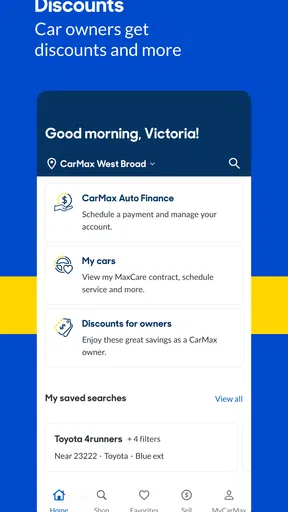
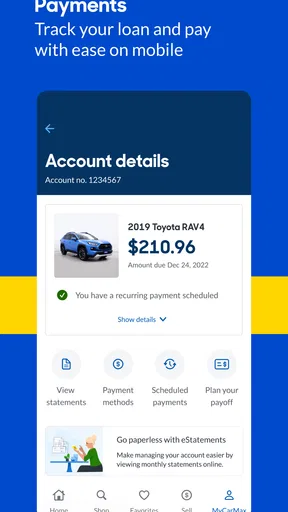
 Analysis by AppCompare
Shopping for a used vehicle is less about finding a nice photo and more about narrowing a big, expensive decision into a few sensible candidates. I find CarMax: Used Cars for Sale most useful as a focused browsing tool: it lets me explore cars, SUVs, and trucks, compare possibilities, and prepare better questions before I visit a location or make a decision. It is not a substitute for inspecting a vehicle or deciding whether its condition and cost work for me, but it can make the early research feel much more manageable.
That distinction matters. A car-shopping app can reduce the time spent opening unrelated listings, yet a polished screen cannot tell me whether a particular vehicle suits my commute, parking space, family needs, or maintenance budget. I would use this one to build a shortlist and understand what I want to investigate next, rather than treat a listing as a final verdict.
A useful starting point for a large search
CarMax is an auto and vehicle shopping app from CarMax Enterprise Services, LLC. It is free, rated for Everyone, and has an average rating of around 4.5 from roughly 36,000 ratings. The app has been available since 2012, and its current version is 4.42.2 for devices running Android 10 or later. Those details help set expectations: this is an established tool for browsing inventory, not a specialist mechanic’s diagnostic app.
The scale is part of the appeal. CarMax says shoppers can search an inventory of more than 40,000 used vehicles, and the app has been installed over 5 million times. A broad selection is helpful when I am still deciding between body styles or brands, though a large pool can also make a search feel like work unless I have a few priorities in mind.
Turning browsing into a practical shortlist
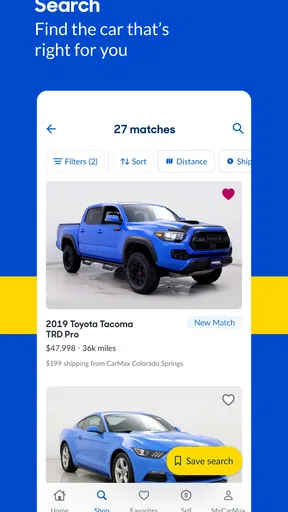
Jumping into the app, you’ll notice it has a slick and intuitive design. The search functionality is top-notch, allowing you to filter by make, model, price, and even mileage. I found myself easily navigating through an extensive range of vehicles. It’s like having a personal car showroom in your pocket.
The app also offers a pretty nifty feature where you can save your favorite cars and compare them. This made my indecisive self feel much more organized. Plus, the detailed photos and descriptions give you a good feel for the vehicle before you even see it in person.
Make comparisons answer a real question
Saving a few candidates is more useful when each one represents a different answer to the same need. For example, I would compare a lower-mileage option with a less expensive one, or set a practical SUV against a smaller car if parking and fuel use matter to me. That keeps the shortlist from becoming a pile of attractive listings with no clear reason for being there.
Worth Reading Before You Choose

Flipboard Shows What News Apps Must Do Beyond the Feed

Switching to Android Auto Means Rethinking Your Driving Routine

Google Calendar Makes a Crowded Week Easier to Manage

Ludo King Makes the Most of the Minutes Between Plans

Baby Panda World Brings Quick Play to Modern Phones, but Its Game Library Feels Busy

ESPN’s Live Game View Makes Following Close Games Easier
I also recommend deciding on a small set of non-negotiables before browsing: the kind of vehicle I need, a spending ceiling, and any must-have features I personally care about. Then I can use the available filters to remove obvious mismatches and save the remaining options. Filters help organize the search, but they cannot decide how much space I need or what compromises I can live with.
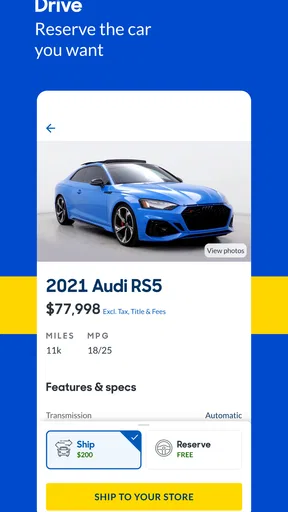
Photos and listing descriptions are best treated as preparation, not proof. I would use them to spot questions for a visit: whether the cabin layout looks practical, whether the exterior images show areas I want to inspect, and whether the description addresses details that matter to me. If something is unclear, I would ask rather than infer an answer from a picture.
Transparency and Trust
One of the standout features of CarMax is its commitment to transparency. Each listing comes with a free vehicle history report, which is a huge plus in my book. I appreciated knowing what I was potentially getting into with each car.
A history report can give a shopper useful context, but I would not mistake it for a complete mechanical inspection. It is one input among several: I would still review the listing carefully, ask about anything that concerns me, and arrange to see and assess a serious candidate before making a commitment. That balance is especially important when a vehicle looks ideal online.
Moreover, the app outlines their 30-day money-back guarantee and 90-day warranty upfront. It’s details like these that build trust and make you feel confident in your purchase decisions.
I would read the applicable terms closely and confirm how they apply to the particular vehicle and transaction I am considering. Seeing a policy mentioned in an app is reassuring, but understanding its conditions is what helps me plan responsibly. I would also keep separate notes on the vehicle’s history, condition, and the questions I still need answered, instead of letting a favorable policy make the decision for me.
Convenience at Your Fingertips
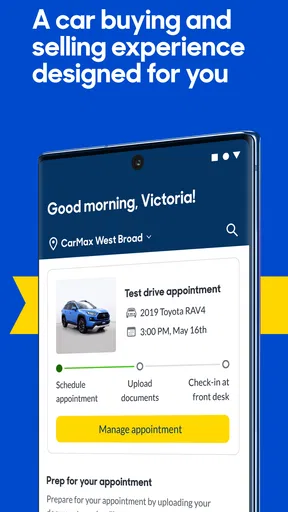
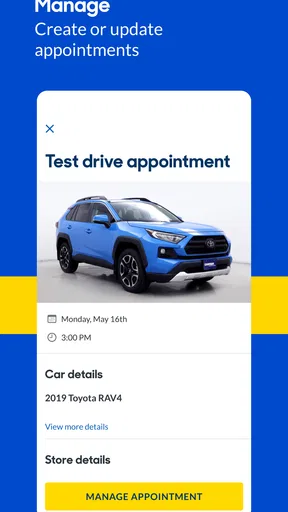
If you’re someone who prefers to do everything from your phone, this app is a dream. From scheduling test drives to handling financing, CarMax makes it possible to do it all without stepping into a dealership. I found the financing estimator particularly handy, as it gave me a realistic picture of my budget.
For a more grounded estimate, I would use the estimator as an early planning aid rather than a promise of final terms. A monthly figure is only one part of vehicle affordability; I would also consider insurance, fuel, maintenance, and the amount I am comfortable spending overall. That makes the tool most useful before I get attached to a particular listing, when I can still adjust my search.
A realistic use case is a shopper who has a busy week and wants to use a lunch break to narrow choices before arranging a visit. I could filter for the body style and price range I want, save a couple of candidates, compare their details, and note which questions need answers. If one remains promising, I can use the app’s test-drive scheduling option as part of the next step. The benefit is not that the whole purchase necessarily happens from the phone; it is that I can make the in-person time more focused.
You can also check out reviews from other buyers, which I found incredibly helpful. It’s like getting advice from a friend who’s already been through the process.
I would use buyer reviews as background on other shoppers’ experiences, not as a guarantee that my own interaction or vehicle will be identical. Reviews can help me decide what to ask and what parts of the process to pay attention to, while the condition and suitability of the specific car still need their own careful review.
Where this app fits—and where it doesn’t
Compared with general classified marketplaces, CarMax is a more focused place to start if I want to browse its used-vehicle inventory and keep my search in one app. A broad marketplace may be preferable when I want to cast a wider net across different sellers or compare listings beyond one retailer. The trade-off is straightforward: a focused catalogue can make the experience more coherent, while a wider marketplace may offer a different mix of choices and require more effort to evaluate each seller and listing.
It is also different from an automotive research app whose main purpose is to explain reliability, ownership costs, or technical specifications. CarMax is oriented toward finding and considering vehicles for sale. If I am still trying to decide which model years have the best long-term track record, I would pair my shopping with independent research rather than expect a sales-browsing app to answer every ownership question.
The same applies to inspection. A listing and its history information help me prepare, but neither replaces checking the actual vehicle. I would arrange an appropriate in-person assessment before buying, especially if I notice inconsistent details or have concerns about wear. For someone who wants an app to diagnose a car, manage repairs, or track maintenance, this is not the right tool; its value is in the shopping stage.
Another practical trade-off is that a big catalogue can encourage endless browsing. I would avoid saving every appealing option. A shortlist of a few genuinely different candidates is easier to compare and gives me a better basis for deciding whether a test drive is worthwhile. If a vehicle falls outside my budget or misses a firm requirement, I would remove it rather than keep it around because the photos look good.
Who will get the most out of it
I would recommend CarMax to people who are actively considering a used car, SUV, or truck and want a structured way to browse, save options, and prepare for the next step. It is especially handy for first-time shoppers who feel unsure how to turn a general wish—such as needing more room—into a manageable list of vehicles to investigate. The filters and comparison workflow can make that early stage less scattered.
It can also help a shopper who already has a preferred make or model but wants to see what alternatives deserve consideration. I would save one familiar choice alongside a couple of realistic substitutes, then compare them against the same needs and budget. This guards against treating the first appealing result as the only sensible option.
On the other hand, I would look elsewhere or use additional resources if my priority were private-party listings, a mechanic’s assessment, detailed model research, or an all-purpose vehicle ownership record. CarMax does not replace those different jobs. And if I already know the exact vehicle I want and prefer to handle every part of the process face to face, the app may be a convenience rather than a necessity.
Before installing, it is also worth checking device compatibility: the current Android version requires Android 10 or later. The app is free to download, which makes it an easy option to try during a search, but I would still judge it by whether its inventory and workflow match what I am actually looking for.
Final Thoughts
Overall, CarMax: Used Cars for Sale delivers a comprehensive and user-friendly experience for anyone in the market for a used car. With its extensive search capabilities, transparent vehicle information, and convenient features, this app could very well be your new best friend in the car-buying journey.
If you’re looking to make a well-informed decision without the hassle of traditional car shopping, I’d say give this app a shot. It’s not just about finding a car; it’s about finding the right car, and CarMax seems dedicated to helping you do just that.
My recommendation comes with one important qualification: use it to become a more prepared shopper, not to make a purchase on autopilot. Set your priorities, compare a short list, check the details, and follow up on anything the listing leaves you wondering about. For that job, the app offers a practical route from browsing to a more informed test drive. If your needs fall outside its focused shopping role, pairing it with independent research—or choosing a broader marketplace—will give you a better-rounded search.
Pros
- Intuitive interface for easy navigation.
- Comprehensive car search filters.
- Detailed vehicle history reports.
- Price comparison tool available.
- Offers financing options directly.
Cons
- Limited private seller listings.
- Occasional app performance lags.
- In-app ads can be distracting.
- Some features require account login.
- Search results can be overwhelming.
FAQs for CarMax: Used Cars for Sale
What features does the CarMax app offer?
The CarMax app provides a comprehensive platform for buying and selling used cars. Users can browse a wide selection of vehicles, access detailed car information, and use filters to refine searches by price, make, model, and more. The app also offers financing options, trade-in estimates, and a car location feature for test drives.
Is the CarMax app free to use?
Yes, the CarMax app is completely free to download and use. There are no hidden fees or subscription costs associated with browsing vehicles or utilizing the app’s features. However, purchasing a car or using certain services may involve costs, which are clearly communicated within the app.
How accurate are the vehicle listings on the CarMax app?
CarMax strives to provide highly accurate and up-to-date vehicle listings. Each listing includes detailed specifications, high-quality photos, and CarMax’s unique multi-point inspection report. While the app is regularly updated, users are encouraged to confirm details directly through the app or by contacting a CarMax representative.
Can I apply for financing through the CarMax app?
Yes, the CarMax app allows users to apply for financing directly within the app. The process is streamlined and user-friendly, offering pre-qualification options without impacting your credit score. Users can compare financing offers and choose the one that best fits their needs, all from the convenience of their mobile device.
How does the test drive process work with the CarMax app?
The CarMax app makes scheduling a test drive easy. Once you find a vehicle you’re interested in, you can use the app to locate the nearest CarMax store where the car is available. You can then schedule a test drive at your convenience. The app provides directions and store details to ensure a smooth experience.


